Once you have created a primary study plan and made your compulsory studies visible on the Structure of Studies page, go to the Guidance page found at the top of the study plan, where you can add comments related to the plan. If you have several study plans in the system, make sure that you add the studies to the primary study plan that is connected to the exchange. The primary study plan must follow the degree structure and be realistic. The exchange studies must fit within the maximum scope of your degree.
- On the Guidance page you can write general comments related to the plan as well as targeted comments. On the page you will also see messages related to applications you have submitted and decisions you have received. The comments and messages are visible to you, the teacher providing guidance, and administrative staff.
-
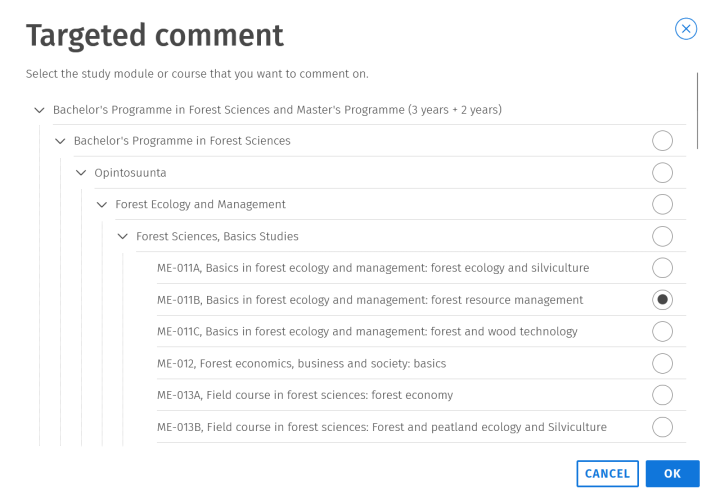
Start writing a message by selecting targeted comment as the message type, and choose from the list that opens the course unit you want to comment on. Finally, click “OK”
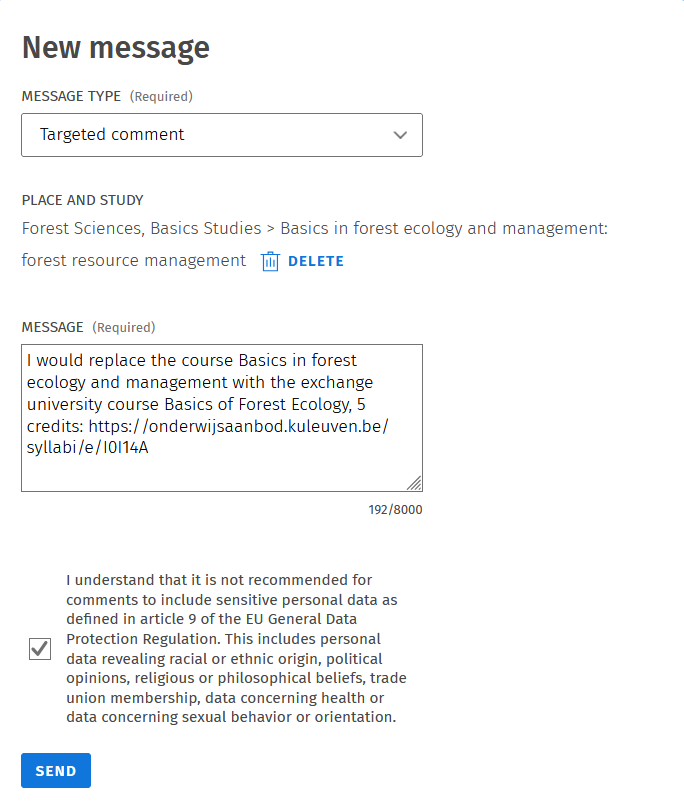
- Then write in the message field:
- the code of the compulsory course unit you will complete during the exchange
- the name and scope of the corresponding course at the host university, in both the host university’s credits and the University of Helsinki credits
- a link to the host university’s course catalogue for that course, or information that no link is available
-
Send the comment.
Note! Your message is not automatically sent through Sisu to the teacher responsible for the compulsory course. Contact the responsible teacher by email and confirm whether the exchange course can replace the compulsory course in your degree.
If you replace a course whose credit value is smaller than that of the course completed during the exchange, you can place the surplus credits in optional studies. If the replaced course has a higher credit value than the course you complete, you can agree on additional work with the teacher.
Add a similar targeted comment for each course unit you are replacing. The comments you write will remain visible at the bottom of the Guidance page and can be seen by your teacher and administrative staff. Please note that comments that have already been sent cannot be edited or deleted. If necessary, add a new comment if you want to provide additional information.